
Arena Breakout Aimbot Guide: Targeting Options, FOV, Smoothness & Customization
Arena Breakout aimbot settings: visible check, draw FOV, target line, max distance, mouse keybind, speed, and smoothness on Infinite PC.
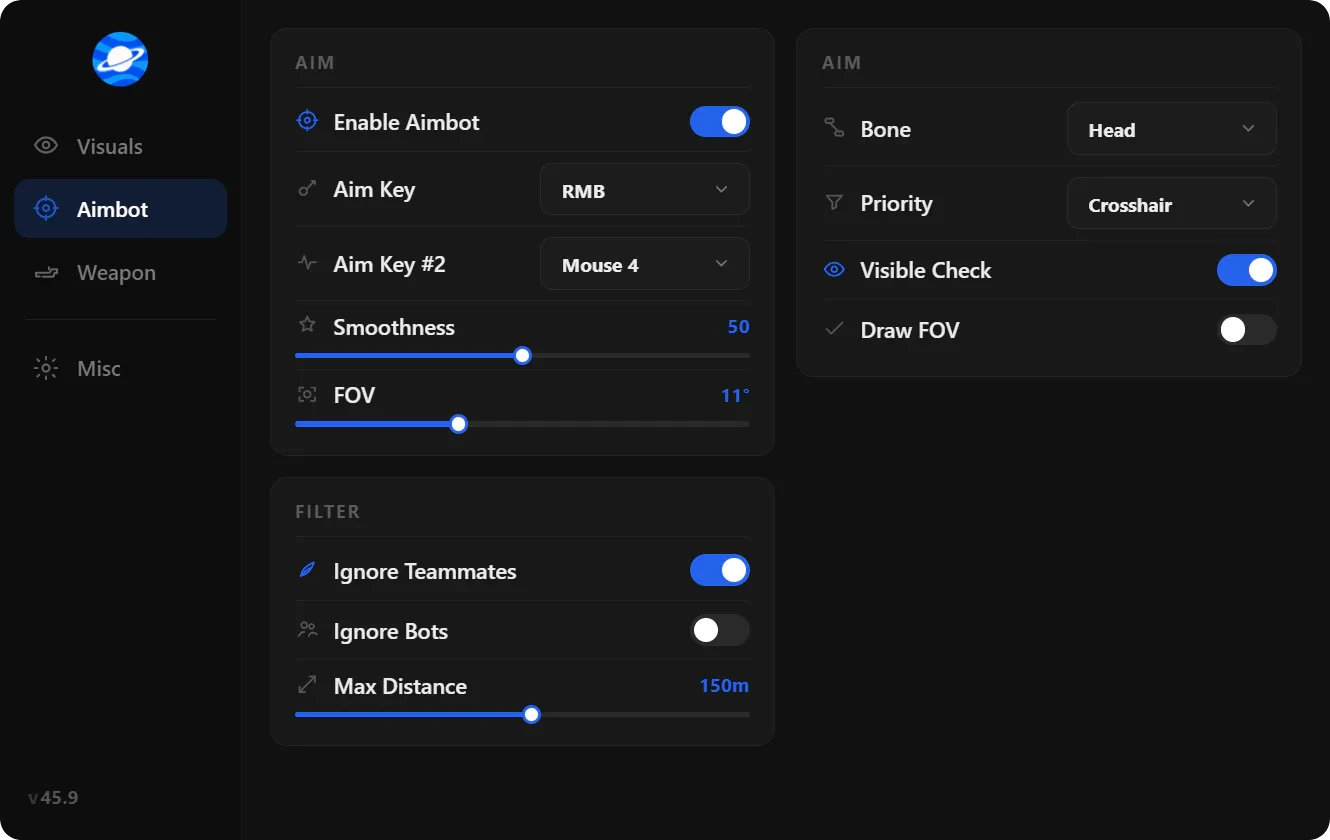
This Arena Breakout aimbot guide is the targeting map for Infinite on PC. One article covers visible check, draw target line, draw FOV, maximum distance, custom mouse keybind, aimbot speed, and FOV size. Smoothness sits with speed because both shape the mouse path ACE’s replay tools can score.
Aimbot here is mouse-path assistance. It does not patch the game binary. Steam still loads kernel ACE. Server checks still validate damage and ammo. You tune sliders so the lock matches the fight you already took, not a 360 snap across Farm.
How the lock is built
You pick a FOV circle, a bone or hitbox, a hold key, and a distance cap. The overlay reads player positions. When a valid target is inside the circle and passes filters, the mouse moves toward that bone at the speed and smoothness you set.
Hold-to-aim is the default first preset. Always-on with a wide FOV is a louder killcam. Start small. Raise FOV only if you miss close swings in Armory.
Target visibility checks
Visible check drops targets behind cover you cannot shoot. Without it, the lock parks on a player through a hotel wall while the actual threat is in the doorway. Leave it on for ranked-value kits. Turn it off only if you are testing draw tools in a throwaway raid.
Ignore knocked (same filter family) stops the crosshair on a downed body while a teammate is still up. Aimbot filter options that skip AI or teammates belong here too. They are not separate posts.
Target line and FOV visualization
Draw FOV shows the circle on screen. Use it while you set size. Hide it for live raids so the HUD stays clean. Draw target line traces from your aim point to the selected bone. That is a debug overlay. It teaches you whether smoothness is catching up. Then you turn it off.
If the line snaps corners, drop speed and raise smoothness before you touch FOV. If the line never reaches the target in a close peek, raise speed a notch, not FOV.
Maximum targeting distance
Maximum distance stops the lock from pulling across a compound you cannot contest. Valley and Northridge punish huge caps. Armory can run shorter. Match distance to your ammo and optic, not to the overlay’s max value.
Custom keybind for mouse
Custom keybind for mouse is the hold or toggle that arms the assist. Side mouse button is the usual bind. Hip-fire and shotgun peeks can stay on a lighter curve or off. Do not bind aim to left click until you have watched a killcam. Fire and lock on the same button makes every shot look assisted.
Aimbot speed, FOV, and smoothness
Aimbot FOV is how wide the circle is. Small FOV = only the player you already framed. Wide FOV = the overlay picks up off-screen motion. Aimbot speed is how fast the mouse closes. Smoothness is how much the path eases instead of snapping.
A tight FOV with moderate smoothness sits closer to a human track. Wide FOV with zero smooth is a replay signature. After an ACE or client bump, reload the last known-good config before you retune. File steps: Arena Breakout cheat config guide.
| Setting | Purpose | First-week note |
|---|---|---|
| Aimbot (master) | Enables the targeting stack | Hold key, not always-on |
| Visible check | Skip targets behind cover | Leave on for real kits |
| Draw FOV | Shows the assist circle | On for setup, off for raids |
| Draw target line | Debug path to the bone | Setup only |
| Maximum distance | Range cap on the lock | Shorter on open maps |
| Custom mouse keybind | Hold or toggle the assist | Side button, not LMB |
| Aimbot FOV | How wide the circle is | Start small |
| Aimbot speed | How fast the mouse closes | Raise before widening FOV |
| Smoothness | How hard the path eases | Keep some ease for killcams |
How this sits next to ESP and ACE
ESP tells you who to fight. Aimbot only helps the shot. Many operators keep Arena Breakout ESP on and aim on a hold key. Device identity is still HWID spoofer, not an aim slider.
Morefun’s replay and killcam path is part of Infinite’s ACE stack. Treat smoothness and FOV as the two sliders that show up in those clips. After a patch, cheap kit, one slider at a time.
Module overview: Arena Breakout cheats explained. ACE and Discord vs portal: Infinite cheats guide. Live suite checkout still runs through Arena Breakout cheats.
FAQ
What does visible check do?
It ignores targets you cannot see from your current angle. The lock stays on the player in the doorway instead of the player behind the wall. Leave it on unless you are testing draw FOV in a junk raid.
Should I draw FOV and target line in every raid?
No. Use them while you set circle size and smoothness. Then hide them. Extra HUD in a killcam is noise. The assist still runs with the draws off.
Is aimbot FOV the same as game FOV?
No. Game FOV is the camera. Aimbot FOV is the overlay circle that selects targets. You can run a wide camera and a small assist circle. That is the usual mix.
Why bind aim to a side mouse button?
So fire and lock are not the same input. You hip-fire or tap without dragging every shot onto a bone. Hold the side button when you already decided to take the fight.
Do I need a different aim config per map?
It helps. Armory wants a smaller FOV and shorter max distance. Valley can use a slightly wider circle and more smoothness for longer tracks. Save each as its own file instead of retuning mid-raid.